Battery Charging Animation App
- 3.7
- Rating
- 10.00M
- Installs
- Free
- Price
 Analysis by App-foxy
I tried Battery Charging Animation as a small personalization app rather than as a tool that changes how a phone charges. That distinction matters. Its purpose is to make the moment you connect a charger feel more noticeable, using visual animation effects instead of promising faster charging or longer battery life. I found that simple idea appealing because charging is usually a forgettable pause in the day, and a brief visual touch can make it feel more personal.
The app is free to start, comes from Niam Technologies, and sits in the personalization category. It has reached over ten million installs and holds a 3.7 average from around twenty-five thousand ratings, which suggests a broad audience but also a mixed experience. I would describe it as a lightweight customization choice for people who enjoy changing the look of ordinary phone interactions, not as an essential battery utility.
What the charging animation actually adds
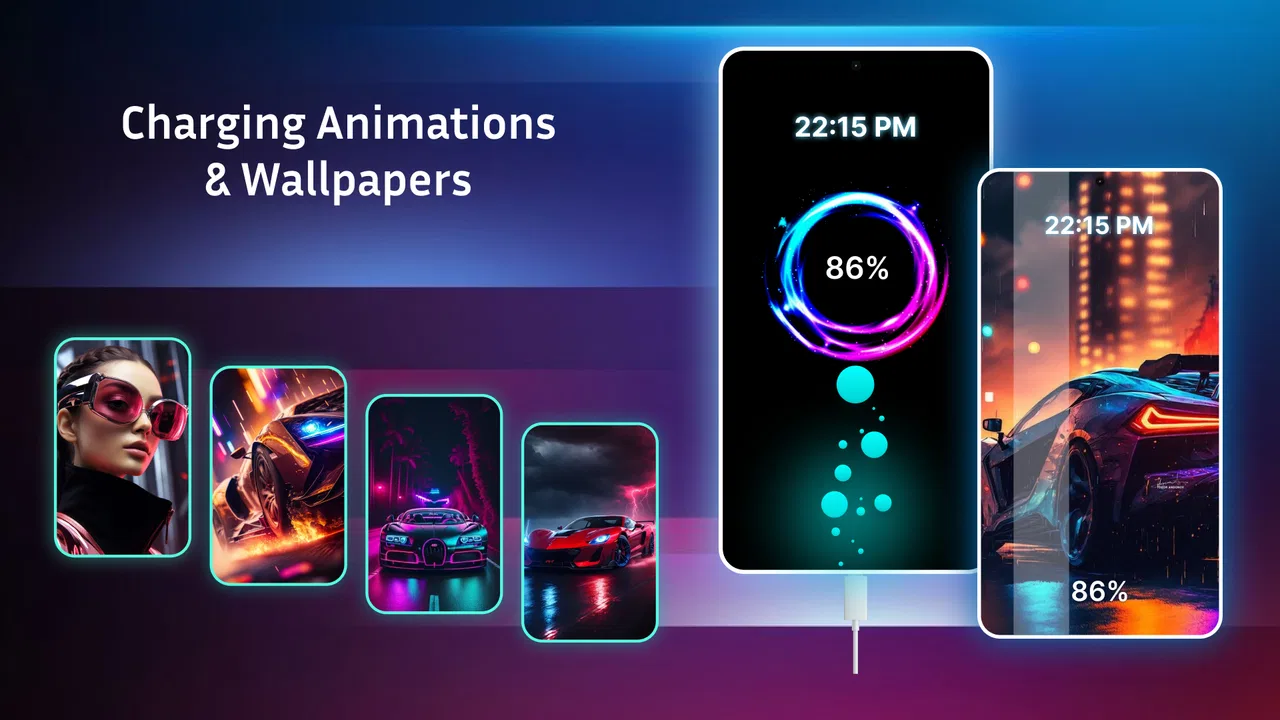
The main attraction is straightforward: when the phone is connected to power, the app can display charging animation effects designed to make that event more entertaining. The store summary calls attention to fun charging visuals, but the practical value is less about information and more about mood. You are not installing a diagnostic dashboard or a replacement for the system battery screen. You are adding a decorative layer to a familiar action.
You May Also Like

 Blood Strike: 2.5 Anniversary
Blood Strike’s Loadouts Turn Every Drop Into a Tactical Gamble
A close look at Blood Strike’s custom loadouts: how fast access to signature weapons reshapes its battle royale rhythm, rewards preparation, and narrows the gap between fights.

 Pandora - Music & Podcasts
Pandora’s Music Is Easy to Start, but Harder to Recover
Pandora’s strength is its low-effort path from a seed to a station. Its weak spot is how much confidence it asks you to place in connection, setup, and quiet recovery.

 8 Ball Pool
 Is Built on Rivalries, Rematches, and Routine
A close look at the rivalries, rematches, shared routines, and unanswered safety questions that turn a quick pool match into a persistent mobile community.

 Samsung Music
’s Quiet Strength Is Playing What You Already Own
Its reach comes less from spectacle than from dependable access to a personal library. That simplicity is both the app’s strongest retention engine and its ceiling.

 AccuWeather: Weather Radar
AccuWeather Review: A Quick, Clear Forecast for Everyday Decisions
For everyday plans, the best forecast is the one you can understand quickly. AccuWeather makes rain timing, radar, and local conditions easy to act on, with a few trade-offs.

 Hill Climb Racing
Why Hill Climb Racing Still Turns Crashes Into One More Run
A tiny car, a bumpy hill and one more upgrade: Hill Climb Racing keeps resurfacing because its simple chaos makes every near-miss feel personal.
More From Our News Desk



That makes the app especially suitable for users who like animated wallpapers, themed interfaces, colorful lock screens, or small visual changes that make a device feel less ordinary. I can also see it working well on a shared family phone, where a noticeable charging effect helps a child recognize that the cable is connected. For someone who wants a quiet, minimal interface, however, the same effect may feel unnecessary after the novelty fades.
One useful way to think about it is as a visual cue rather than a battery feature. If you often connect your phone in a dark room, at a desk, or beside your bed, an animation can make the charging state easier to notice at a glance. I would still rely on the phone’s own battery indicator for precise information. The animation is decoration first, confirmation second.
The most important expectation to set is that visual charging effects do not make the battery fill faster. They also should not be treated as proof that the charger, cable, or battery is healthy. If your real goal is improved charging speed, temperature control, battery diagnostics, or power-saving automation, the built-in system tools or a dedicated utility will be a better match.
How it feels in everyday use
A realistic use case is arriving home with a nearly empty phone, plugging it in near the entrance, and seeing the selected charging effect appear. That small response can be satisfying, especially if you enjoy matching your phone’s appearance to your personality. Another scenario is using a distinctive animation at work or school so you can recognize your own device quickly when several phones are charging nearby.
I also think the app makes more sense for occasional visual refreshes than for constant attention. You might choose an effect that fits a holiday, a favorite color, or a new wallpaper, then leave it alone for weeks. Used that way, it adds character without turning charging into an interruption. If you expect a deep personalization suite with every part of the charging screen under your control, the experience may seem narrower.
The app’s Teen content rating is worth keeping in mind for families. It is not presented as a children’s educational tool, so parents who allow it on a younger user’s phone should still review the experience themselves. The free entry point makes trying it easy, while optional in-app purchases range from less than a dollar to about fifteen dollars per item. I would avoid spending immediately and first decide whether the visual effect remains enjoyable after repeated charging sessions.
Speed expectations and the cost of visual polish
From a user’s perspective, the app should feel responsive at the moment a charger is connected. That is the key speed test here, not the time needed to fill the battery. A charging animation that appears promptly can make the app feel polished; one that appears late or inconsistently can make the whole idea feel pointless. Because the app is focused on a brief visual event, even a small delay is more noticeable than it would be in a utility that you open only occasionally.
I would not judge its performance by the animation itself. A complex effect may look busy while still requiring little interaction, and a simple effect may feel faster because it gets out of the way. The better question is whether the visual response remains comfortable during normal use. If the animation distracts you when you only wanted to connect the cable, switching to a calmer option is more sensible than assuming your phone is struggling.
There is also a practical trade-off between visibility and restraint. A bold effect is easier to notice from across a room, but it may be irritating during repeated short charging sessions. A subtle effect is less disruptive, though you may miss it entirely. I recommend choosing based on where you normally charge: a bedside phone benefits from a restrained presentation, while a device used in a busy office may benefit from something more distinctive.
Battery Charging Animation should not be confused with a charging optimizer. It does not replace the charger’s power delivery, the phone’s charging controller, or the operating system’s battery management. If your phone charges slowly, the first things to examine are the charger, cable, outlet, temperature, and battery condition. Installing an animation app will not solve those hardware or system limitations.
What happens during heavy-use moments
The most demanding situations are not necessarily long charging sessions. They are moments when the phone is already busy, the screen is active, and the charging visual is competing with other activity. For example, connecting power while navigating, recording video, playing a game, or installing updates creates a more crowded environment than plugging in an idle phone. In those situations, I prefer an effect that remains brief and does not demand interaction.
There is a useful workflow here: choose an animation, connect the phone while it is idle, and observe whether the visual behaves comfortably before using it during a busy task. This avoids judging the app only under ideal conditions. It also helps you decide whether the effect is suitable for a phone that is often used while charging. An animation that looks attractive in a preview may be less pleasant when it appears repeatedly during short top-ups.
Short charging bursts are another overlooked case. Many people connect a phone for a few minutes while getting ready, waiting for a train, or sitting in a café. In that pattern, the animation may appear more often than during one overnight charge. If you find yourself seeing the same effect dozens of times a day, the novelty can turn into visual clutter. I would use a simpler design for frequent top-ups and reserve an elaborate look for occasional charging.
Resource demands are difficult to judge from appearance alone, so I would not assume that a colorful animation is automatically expensive or that a simple one is automatically efficient. The sensible approach is to watch your phone’s normal behavior after installing it. If the device becomes less comfortable to use, the effect feels intrusive, or charging notifications become confusing, remove the visual layer and compare the experience with the standard system behavior.
This is also where the app’s category matters. A personalization app earns its place by improving how the device feels, not by delivering measurable battery gains. Any extra visual activity should therefore justify itself through enjoyment or convenience. For users who are strict about battery consumption, a static system indicator remains the safer and clearer choice.
Reliability, consistency, and recovery
Reliability is especially important for an app triggered by a physical event. You do not want to open it every time you plug in; you want the selected effect to behave consistently when charging begins. The experience is strongest when it feels like part of the phone’s routine rather than another task to maintain.
Android behavior can vary by device, manufacturer, system settings, and background management. Battery-saving modes and aggressive app restrictions may affect how background experiences behave, even when the app itself is working normally. I would therefore avoid treating one successful charging session as proof that every future session will look identical. The practical test is repeated use across different situations: screen on, screen off, phone locked, and charging from different places.
If the animation does not appear, my first recovery step would be simple: open the app, check the selected effect, and reconnect the charger after confirming that the phone itself recognizes power. I would then review the phone’s battery-management settings for the app. If the system is limiting background activity, that may explain inconsistent behavior. There is no reason to change several settings at once; making one adjustment at a time makes it easier to identify the cause.
Another sensible recovery habit is to keep the system charging indicator as the authority. If the animation fails but the battery icon shows that charging has started, the phone is still doing its main job. Conversely, if the system does not recognize the charger, an animation should not reassure you that power is flowing. This separation between decoration and confirmation prevents a confusing visual effect from masking a cable or outlet problem.
The app’s 3.7 average rating reflects that this is not a universally smooth experience for everyone. I would interpret that rating as a reason to test it on your own phone rather than as an automatic warning. Personalization apps are unusually sensitive to screen layout, Android versions, manufacturer interfaces, and individual tolerance for visual effects. What feels charming on one device can feel distracting on another.
Device constraints and Android compatibility
The current version is 4.1.75, and the app supports devices running Android 8.0 or later. That gives it a fairly broad possible audience, including phones that are no longer among the newest models. Still, compatibility on paper does not guarantee an identical presentation across every device. Screen proportions, lock-screen design, notification behavior, and manufacturer customizations can all influence how a charging visual fits into the overall experience.
Older phones deserve a more cautious approach. Even when the app installs, a device with limited memory or a heavily customized interface may handle overlays and background behavior differently from a newer phone. I would install it when the phone is cool, test one effect at a time, and avoid judging performance while many other apps are updating. That is a practical way to separate the app’s behavior from general device strain.
There is also a question of screen habits. If your phone normally stays face down, uses an always-on display, or remains locked in a bag while charging, you may rarely see the animation. In that case, the app offers less value than it would on a phone placed screen-up on a desk. This is one of the clearest situations where the usual system indicator is better: it is always tied directly to the phone’s standard charging state and does not depend on a decorative presentation being visible.
People who use their phone mainly for work may also want to be selective. A charging animation can be a pleasant personal touch, but it may be unwelcome in a quiet meeting or shared workspace. Before choosing a bright or attention-grabbing effect, consider whether other people will see it and whether you frequently charge in public. A discreet choice can preserve the personalization without making the phone feel noisy.
On the other hand, the app is a good fit for a secondary phone, a family device, or a handset used as a bedside media player. Those devices often benefit from visual identity more than from another productivity tool. A distinctive charging effect can make it immediately clear which device is connected and give an otherwise plain setup a little personality.
Who should use it and who should skip it
I would recommend Battery Charging Animation to someone who enjoys small interface changes and wants charging to feel more expressive. It is also worth trying if you want a visual cue that stands apart from the standard battery icon, provided you understand that the cue is decorative. The free price makes experimentation relatively easy, while the optional purchases mean you can decide later whether additional content is worth paying for.
I would skip it if your priority is measurable battery improvement, charging diagnostics, lower power use, or a completely distraction-free screen. A dedicated battery monitor is more appropriate for health and usage information. The operating system’s own tools are better for basic charging confirmation. A wallpaper or theme app may be a better alternative if your main goal is broad visual customization rather than one charging moment.
I would also hesitate to recommend it to someone who becomes frustrated by inconsistent background behavior. Because charging visuals depend on the phone recognizing the event and allowing the app to respond appropriately, a heavily restricted device may require troubleshooting. If that sounds like more effort than the feature is worth, the default charging display is the more dependable option.
For people who are sensitive to screen brightness or motion, the choice of effect matters. A restrained animation may be acceptable, but a lively effect can be tiring when repeated at night. I would test it during the time of day when you charge most often, not only in bright daytime conditions. If the visual pulls your attention away from sleep or work, it has stopped serving its purpose.
My performance verdict
Battery Charging Animation succeeds as a small personalization layer. Its perceived speed depends on how promptly the visual responds, its stability depends partly on the phone and Android settings, and its resource impact should be judged through normal use rather than assumed from the artwork. The app’s strongest quality is immediacy: it gives a routine action a visible identity. Its main weakness is that the benefit is subjective and can wear thin if you charge frequently.
I like the idea when it stays in the background and appears only as a pleasant confirmation. I would choose a modest effect, test it through several charging routines, and keep the system battery indicator available for real information. I would also avoid paying for extras until I knew the app behaved reliably on my particular device and that I still enjoyed seeing the animation after the first few days.
Released on February 16, 2022, and maintained at its current version, the app has clearly found a large audience, but its average rating shows why it should be approached as an optional extra rather than a must-have utility. My overall view is positive but measured: it is a fun visual accent, not a solution to charging problems. If you want your phone to feel a little more personal when connected to power, it is worth trying. If you want speed, battery health insight, or maximum simplicity, stick with the tools already built into Android.
FAQs for Battery Charging Animation App
01What is the Battery Charging Animation App?
The Battery Charging Animation App is designed to enhance your device's charging experience by displaying engaging animations while your phone charges. It adds a fun, visually appealing element to the otherwise mundane process of charging your device, making it more interactive and enjoyable to watch.
02Is the Battery Charging Animation App safe to use?
Yes, the app is safe to use. It does not interfere with your device’s charging mechanism or battery health. The app merely overlays animations and operates within the safety standards set by Android and iOS platforms. Always ensure you download the app from trusted sources to avoid any security risks.
03Does the app consume a lot of battery power?
The Battery Charging Animation App is optimized to consume minimal battery power. It only activates while your device is charging, ensuring that it doesn’t drain your battery unnecessarily. Users can also customize settings to further reduce power usage, such as choosing simpler animations or adjusting brightness levels.
04Can I customize the animations in the app?
Yes, the app offers a variety of customization options. Users can choose from a wide selection of animations, themes, and colors to personalize their charging experience. Some versions of the app may also allow you to upload your own animations, providing a truly unique and personal touch.
05Does the app work on all devices?
The app is compatible with most Android and iOS devices. However, functionality may vary depending on the device model and operating system version. It is recommended to check the app requirements and reviews on the app store to ensure compatibility with your specific device before downloading.
Pros
- Visually appealing animations.
- Customizable animation themes.
- User-friendly interface.
- Low battery usage.
- Supports multiple languages.
Cons
- Contains ads between animations.
- Limited free themes available.
- Requires location permissions.
- Occasional lag in animations.
- No offline functionality.

Battery Charging Animation App
Gallery